
The API Cost Trap: Replaced Cloud Servers with Client-Side Processing in Next.js
Author
Muhammad Awais
Published
May 11, 2026
Reading Time
6 min read
Views
129
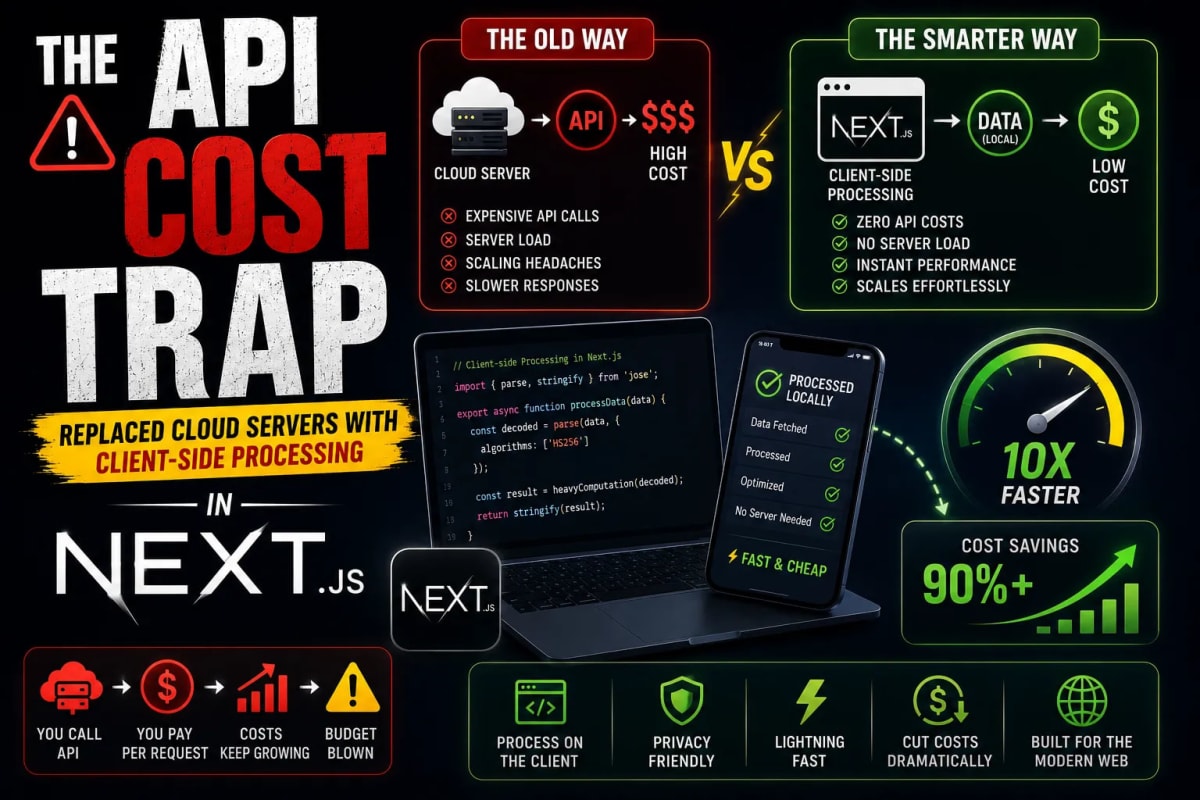
Let's talk about the nightmare every indie hacker and solo developer faces in 2026: The API Cost Trap. You spend weekends building a brilliant Next.js application, you launch it to the world, and by some miracle, it goes viral. Thousands of users are compressing images, generating documents, or interacting with your AI features. You feel like you've made it until the end of the month arrives. You open your inbox to find a $2,500 invoice from your cloud provider and a $1,000 bill from your API services. Your free tier is gone, and your viral success has effectively bankrupted you. Today, we are breaking out of this trap. We are going to explore how modern Next.js developers are utilizing WebAssembly (Wasm) and aggressive Client-Side Processing to build incredibly powerful applications with a server cost of exactly zero dollars.
The Great Cloud Lie
For the last decade, the tech industry has pushed a singular narrative: the browser is just a "dumb client" meant to display HTML, and all real computation must happen on a centralized Node.js, Python, or Go server. This led to the explosion of microservices and third-party APIs. Need to convert an image to WebP? Send it to an API. Need to generate a PDF? Send it to an API. Need to format a string? Send it to an API.
This architecture is fantastic for the cloud providers printing money off your bandwidth, but it is terrible for your wallet. Sending a 5MB image to a server, waiting for it to process, and downloading it back is incredibly inefficient. It wastes time, it wastes bandwidth, and it exposes proprietary user data to third-party networks. In 2026, modern browsers running on devices like the iPhone 16 or M4 MacBooks are literal supercomputers. It is time we start treating them like it.
WebAssembly (Wasm): The Backend Killer
The paradigm shifted with the mainstream adoption of WebAssembly. Wasm allows developers to write code in low-level languages like C++, Rust, or Go, compile it into a binary format, and run it directly inside the user's browser at near-native speeds. This means you can take heavy, server-side libraries (like FFmpeg for video processing or libvips for image manipulation) and execute them directly in the user's DOM.
When a user wants to compress a massive image, you no longer upload it to an AWS S3 bucket. You load the file into the browser's memory, pass it to a WebAssembly module, process it using the user's own CPU, and output the result. Your server does absolutely nothing. Your server costs remain flat, regardless of whether you have 10 users or 100,000 users.
Case Study: The WebToolsHub Ecosystem
When we architected WebToolsHub, our primary directive was strict zero-cost scalability. Take our Image to WebP Converter as an example. Traditional websites upload your image to their server. We utilize pure client-side HTML5 Canvas APIs and Web Worker threads. Your image never leaves your computer.
The same philosophy applies to our Advanced QR Code Generator. Instead of relying on a paid API to render the QR matrix, the entire calculation and SVG/PNG generation happens mathematically in your local memory. We serve the JavaScript bundle once, and the user's device does the heavy lifting.
Preventing UI Freezes with Web Workers
There is a catch to client-side processing: JavaScript is single-threaded. If you run a massive cryptographic function or a heavy image compression algorithm on the main thread, the user's browser will completely freeze. They won't be able to scroll, click, or see animations until the process finishes. This is a terrible user experience.
To solve this in Next.js, Senior Developers utilize Web Workers. A Web Worker allows you to spin up a background thread that runs completely separate from the UI thread. Here is how you securely architect a background worker in a modern Next.js application:
// Inside your Next.js component
const processHeavyData = async (dataPayload) => {
  return new Promise((resolve, reject) => {
    // 1. Initialize the Web Worker
    const worker = new Worker(new URL('../workers/heavy-task.worker.js', import.meta.url));

    // 2. Send the heavy payload to the background thread
    worker.postMessage(dataPayload);

    // 3. Listen for the processed result
    worker.onmessage = (event) => {
      resolve(event.data);
      worker.terminate(); // Kill the worker to free up RAM
    };

    worker.onerror = (error) => {
      reject(error);
      worker.terminate();
    };
  });
};
By offloading the task to a worker, your Next.js frontend remains buttery smooth and responsive at a perfect 60 frames per second, even while chewing through gigabytes of local data.
The Ultimate Privacy Advantage (GDPR & HIPAA)
Beyond the massive cost savings, client-side processing solves the biggest headache in modern web development: data privacy compliance. In 2026, regulations like GDPR in Europe and HIPAA in the US are heavily enforced. If a user uploads a PDF containing sensitive financial data to your server for parsing, you are legally responsible for securing that data both in transit and at rest.
When you utilize an architecture like our JSON to TypeScript Converter, the user's proprietary backend schema is parsed locally. It is never transmitted across the internet. By mathematically guaranteeing that user data never touches your backend, you completely bypass the complexities of data liability. You cannot leak data you never collected. For enterprise clients and privacy-conscious users, "100% Client-Side" is the ultimate selling point.
Frequently Asked Questions (FAQs)
If everything is client-side, isn't my source code exposed?
Yes, your frontend logic is visible to the client. However, Next.js utilizes Webpack/Turbopack to minify and obfuscate your production code, making it incredibly difficult to reverse-engineer. Furthermore, if you compile your core logic into WebAssembly, it acts as a compiled binary, which is significantly more secure against theft than standard JavaScript.
Can I do database operations on the client-side?
Not securely. While you can use local storage, IndexedDB, or even SQLite compiled to Wasm for local data persistence, you cannot connect directly to a remote Postgres or MongoDB instance from the browser without exposing your database credentials. Authentication and database reads/writes must still happen via secure Edge middleware or server-side API routes.
Does heavy client-side processing drain mobile phone batteries?
It can, if unoptimized. Running sustained 100% CPU loads will drain a mobile battery. However, short bursts of computation (like converting an image or generating a QR code) take mere milliseconds on modern smartphones and have a negligible impact on battery life. Always benchmark your tools on mid-tier Android devices.
Conclusion: Scale Without the Server
The future of indie software development is not about managing fleets of Kubernetes clusters; it is about writing hyper-efficient frontend code that leverages the hardware the user already owns. By escaping the API cost trap and migrating heavy computation to Web Workers and WebAssembly, you insulate yourself from viral scaling bills. You build applications that are faster, infinitely more secure, and perfectly tailored for the privacy-centric web of 2026. Stop paying for compute you don't need. Empower the browser.
Tagged in
Continue Reading
All Articles

Level Up Your Workflow
Free tools mentioned in this article
Word & Character Counter
Free online word and character counter tool. Instantly calculate words, characters, sentences, and reading time for essays, social media, and SEO posts.
HTML to JSX / TSX Converter
Instantly convert HTML code to React JSX or TSX components. Automatically handles className, style objects, SVGs, and self-closing tags with secure, in-browser processing.
SQL Query Validator
Validate and format SQL queries instantly MySQL, PostgreSQL, SQLite & SQL Server. Free online SQL query checker with detailed error messages. No signup needed.
Shadcn Theme Generator
Visually generate and preview Shadcn UI themes. Customize HEX to HSL colors, enforce flat design, and instantly copy globals.css and tailwind.config.ts code.