
Base64 Images vs External URLs: Performance Guide & When to Use (2026)
Author
Muhammad Awais
Published
November 11, 2026
Reading Time
7 min read
What are Base64 Images?
Base64 image encoding is a binary-to-text translation process. It takes raw image bytes from PNG, JPEG, SVG, or WebP files and converts them into standard ASCII characters formatted as a Data URI.
Instead of linking to a remote URL like /assets/icon.png, the image data sits directly inside your HTML or CSS source code. You can generate these strings easily using a free Image to Base64 Converter.
How Base64 Inlining Works in HTML and CSS
When you inline a Base64 image, the browser reads the graphic data synchronously as it parses the document. This removes the need to initiate an external network request.
Here is how a Base64 image looks directly inside an HTML image tag:
<img src="data:image/png;base64,iVBORw0KGgoAAAANSUhEUgAA..." alt="App Icon" width="32" height="32" />You can also embed Base64 images directly inside your stylesheets as background graphics:
.button-chevron {
  width: 16px;
  height: 16px;
  background-image: url("data:image/svg+xml;base64,PHN2ZyB4bWxucz0...");
  background-repeat: no-repeat;
}
The Core Advantages of Base64 Images
Embedding image data directly into markup offers several concrete advantages for modern web applications and email templates:
- Zero Extra HTTP Requests: The browser parses the image on the spot. It does not need to send a DNS lookup, TLS handshake, or HTTP GET request to a remote server.
- Immune to 404 Not Found Errors: Because the asset is bundled directly inside the code, it cannot be accidentally unlinked, moved, or deleted from an external media bucket.
- Instant Hover State Transitions: Background graphics on hover buttons display immediately without the brief visual flicker caused by lazy-loaded network assets.
- Self-Contained Single File Documents: Offline web apps, invoices, and automated PDF exports can package all visual branding inside one portable HTML document.
The Performance Downsides: Size and Caching Penalties
Despite its benefits, Base64 is not a silver bullet. Misusing inline images can severely hurt your Core Web Vitals and site speed.
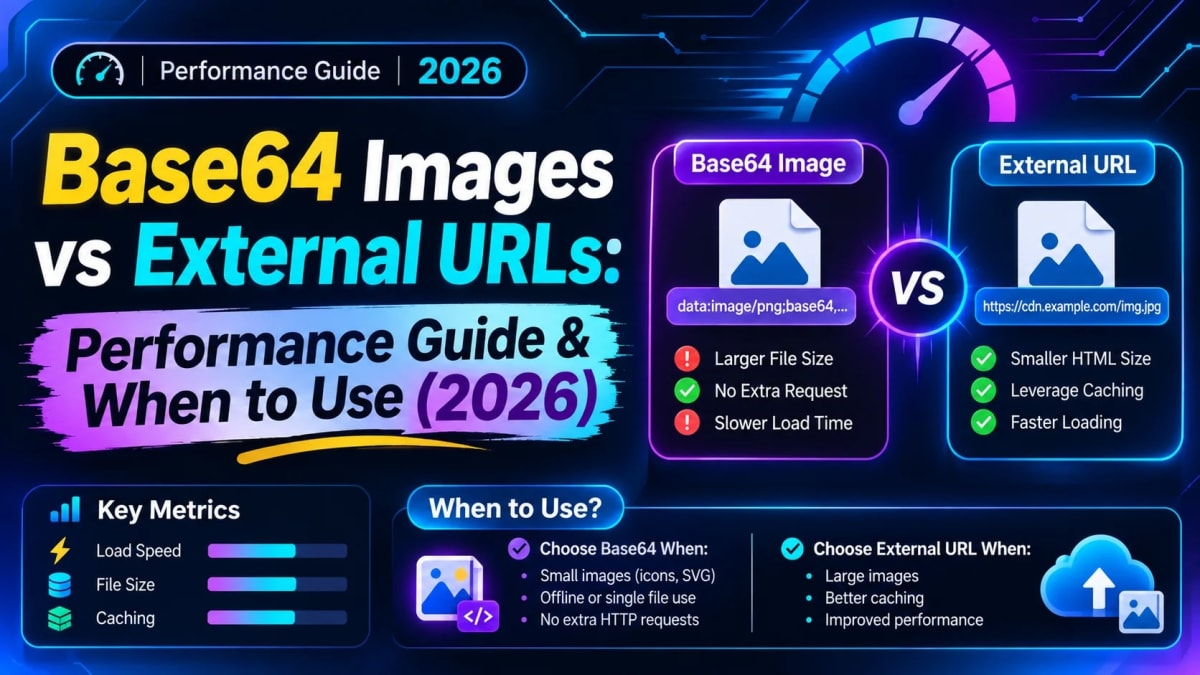
The primary drawback is the 33% file size penalty. Base64 encodes 3 binary bytes into 4 ASCII characters. A 30 KB JPEG will bloat to approximately 40 KB once encoded.
The second major downside is cache invalidation. An external image is cached independently by browser CDNs. When an image is embedded inside your CSS file, updating a single graphic forces users to re-download the entire stylesheet.
Direct Comparison: Base64 vs External File URLs
The table below highlights the key technical trade-offs between inline Base64 data and traditional external image URLs:
| Evaluation Factor | Base64 Data URI | External Image URL |
|---|---|---|
| HTTP Requests | 0 Requests (Instant) | 1 Request per image |
| Payload Size | +33% Size Overhead | Original Binary Size |
| Browser Caching | Tied to HTML/CSS cache | Cached independently |
| HTML Parsing Speed | Slight CPU decode cost | Non-blocking parallel fetch |
| Best Asset Size | Under 2 KB | Any size (Large photos) |
When Should You Use Base64 Images?
Follow these clear development rules to maximize performance without bloating your page weights:
1. Micro UI Icons (Under 2 KB)
Tiny SVG or PNG icons like arrows, chevrons, and checkmarks are ideal candidates for Base64. Saving an HTTP round-trip produces a noticeable speedup that outweighs the minor size overhead.
2. Low-Quality Image Placeholders (LQIP)
For hero images and gallery grids, modern frameworks inline a tiny blurred Base64 thumbnail (around 20x20 pixels). This renders instantly while the full-resolution photo loads in the background.
3. HTML Email Signatures
Corporate email firewalls frequently block external image URLs. Inlining small company logos directly inside HTML email signatures ensures your branding displays immediately for recipients.
When Should You Avoid Base64 Images?
Avoid Base64 for the following scenarios where traditional image optimization delivers superior performance:
- Full Photographs: High-resolution camera photos should never be Base64 encoded. Convert them to modern formats using our Image to WebP Converter instead.
- Assets Larger than 10 KB: Large strings delay First Contentful Paint (FCP) and bloat DOM size. Compress them using our Image Resizer & Compressor.
- Multi-Page Shared Assets: Logos and banners shared across multiple web pages benefit from standalone browser caching rather than being re-downloaded inside every HTML file.
Frequently Asked Questions
Does Gzip compression offset the Base64 size penalty?
Yes, partially. Text compression algorithms like Gzip and Brotli compress repetitive ASCII strings effectively. However, the compressed Base64 string will still remain roughly 10% to 15% larger than a compressed binary image.
How do I convert an image to Base64 in JavaScript?
In modern web browsers, use the standard FileReader API and call readAsDataURL(file). The resulting string contains the complete Data URI ready for DOM assignment.
Can I decode a Base64 string back into an image file?
Yes. You can paste any Base64 string into our Image to Base64 Converter to inspect its format, preview the visual render, and download the reconstructed image file instantly.
Tagged in
Continue Reading
All Articles


Level Up Your Workflow
Free tools mentioned in this article
Image to WebP Converter
Convert up to 25 JPG, PNG, TIFF and BMP images to WebP with live before/after preview, smart resizing, and real-time savings metrics 100% client-side, nothing uploaded.
Image Resizer & Compressor
Compress image to 20KB, 50KB, or 100KB online free instantly reduce image size in KB for government forms, exams (UPSC, SSC, FPSC, NTS), passport photos, and more. Works entirely in your browser.
Image DPI Converter & Checker (300 DPI)
Check current photo DPI and losslessly convert JPG or PNG to 200, 300, or 600 DPI with print size calculator, 100% browser-side.
HEIC to JPG Converter
Free bulk online HEIC to JPG converter. Batch convert Apple iPhone HEIC and HEIF photos to high-quality JPG, PNG, or WebP with 100% client-side privacy.