
The Zero-Budget Creator: Build a Professional Brand Without Paid Software
Author
Muhammad Awais
Published
May 12, 2026
Reading Time
6 min read
Views
223

Whether you are launching a faceless YouTube channel, starting a freelance graphic design business, or digitizing your local cafe's menu, the software industry wants you to pay monthly subscriptions. Stop falling into the trap. Discover the ultimate free, browser-based toolkit to build a premium personal brand in 2026 without spending a single dollar.
The Subscription Epidemic
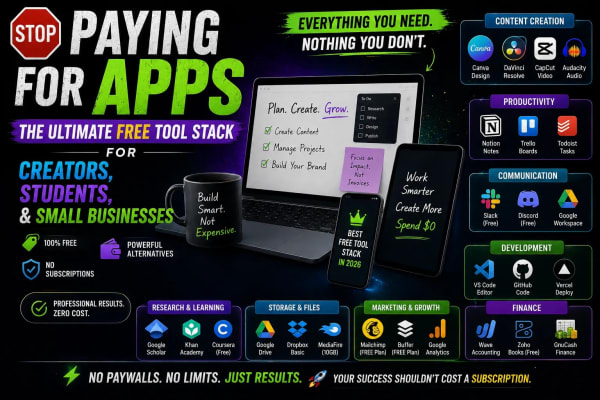
Let's be brutally honest: The modern internet has become incredibly hostile to beginners. Ten years ago, you could download a piece of software once and own it forever. Today, every single app, platform, and digital tool demands a $9.99 monthly subscription. If you are a student trying to build a portfolio, a freelancer launching a side hustle, or a small business owner trying to survive in a digital economy, these "micro-subscriptions" silently drain your bank account before you even make your first sale. But there is a massive shift happening in 2026. The smartest creators are abandoning heavy, expensive apps in favor of lightweight, hyper-fast, 100% free browser utilities. Today, we are going to outline the ultimate "Zero-Budget Creator Stack."
Step 1: The Social Media First Impression
With over 5 billion people on social media, attention is the most valuable currency on earth. When someone lands on your Instagram, TikTok, or X (Twitter) profile, you have exactly 1.5 seconds to convince them to hit the "Follow" button. If your bio looks like millions of other boring, default-text bios, you lose.
Influencers and top-tier brands use custom typography to instantly create a visual hook. However, the biggest mistake beginners make is downloading sketchy "Font Keyboard" apps from the App Store. These apps often demand access to your keystrokes, harvesting your private data. The professional, secure alternative is utilizing a browser-based Fancy Font Generator. You simply type your standard bio, and it instantly generates beautifully formatted Unicode text (like Cursive, Gothic, or Bold Aesthetic styles). Copy, paste it into your profile, and you have instantly elevated your brand's aesthetic with zero privacy risks.
Step 2: Bridging the Physical and Digital Worlds
Beware of the QR Code Ransom Trap
If you run a physical business—a restaurant, a salon, or a real estate agency—you need QR codes for menus, WhatsApp business chats, and Wi-Fi access. Many people Google "Free QR Code", use the first website they find, and print 5,000 expensive flyers. Two weeks later, the code stops working, and the website demands a $20/month "activation fee" to turn it back on. This is a notorious scam known as a Dynamic QR Trap.
To protect your business, you must generate Static QR Codes. The data in a static code is mathematically baked into the black-and-white squares; it can never expire, and no one can hold it for ransom. By using a professional, client-side Advanced QR Code Generator, you can create customized, permanent codes for your VCard (digital business card), your YouTube channel, or your storefront Wi-Fi. You own the code forever, for free.
Step 3: The 3-Second Website Rule
Whether you are setting up a Shopify store, a WordPress blog, or a personal portfolio, there is one universal law of the internet: Speed is Revenue. Amazon found that every 100 milliseconds of latency cost them 1% in sales. If your website takes longer than 3 seconds to load on a mobile phone, 53% of your visitors will close the tab and never return.
The number one reason websites load slowly? Massive, unoptimized images. Modern smartphones take incredible photos, but those files are often 5MB to 10MB each. Uploading these directly to your blog is digital suicide. Google will actively penalize your website's search ranking for being too slow.
You don't need to pay for an expensive Adobe Photoshop subscription to fix this. Before uploading any picture to the internet, run it through a modern Image to WebP Optimizer. WebP is a next-generation image format developed by Google. It shrinks your massive 5MB JPEG down to a microscopic 50KB file without any visible loss in quality. Your website will load instantly, your SEO ranking will soar, and your bounce rate will plummet.
Step 4: The Privacy Advantage of Browser Tools
Why are browser-based tools better than downloaded software? It comes down to architecture. Historically, online tools required you to upload your files to a remote server. The server processed your data and sent it back. This was slow and presented a massive privacy risk (who knows what they are doing with your photos or documents on their server?).
In 2026, premium utility platforms like WebToolsHub utilize "100% Client-Side Processing." Through advanced web technologies like WebAssembly (Wasm) and HTML5 Canvas, your phone or laptop's own processor does the heavy lifting. Your private images, your business text, and your generated codes never actually leave your device. They are not saved to any database. You get enterprise-grade speed and absolute, mathematical privacy.
Conclusion: The Mindset of a Smart Digital Citizen
Building a successful brand, side hustle, or small business in 2026 is not about who has the biggest software budget. It is about who is the most resourceful. Stop paying monthly fees for basic digital utilities. Bookmark reliable, privacy-focused, free browser tools. Optimize your social media with unique typography, secure your marketing with permanent QR codes, and guarantee your website speed with next-gen image compression. The internet belongs to creators; equip yourself with the right tools and start building.
Frequently Asked Questions
Are these browser tools really safe to use for sensitive business data?
Yes, provided you use tools with client-side architecture. Because processing happens locally in your browser's memory, your data is never uploaded to a remote server. It is significantly safer than downloading unverified apps from an app store.
Will using Fancy Fonts affect my social media SEO?
Fancy fonts (Unicode characters) are great for visual appeal in names or short bios, but they shouldn't be used for your main searchable keywords. Social media search algorithms read them as symbols rather than standard letters. Use them strategically for aesthetics, but keep your core industry keywords in standard text.
Do WebP images work on older devices, like old iPhones?
Yes! While WebP was introduced years ago, it is now universally supported across all modern browsers, including Safari on iOS, Google Chrome, Firefox, and Edge. It is the modern standard for web delivery.
How do free tool websites make money if there is no subscription?
Premium free utility platforms are typically supported by unobtrusive, programmatic advertising or direct B2B sponsorships. This allows the platform to cover hosting costs while keeping the actual tools completely free and accessible for everyday users globally.
Tagged in
Continue Reading
All Articles
Level Up Your Workflow
Free tools mentioned in this article
Regex Tester & Debugger
Test, debug, and validate JavaScript regular expressions instantly. Live match highlighting, capture groups, all flags supported - free, client-side, zero logs.
Sitemap Validator
Free XML sitemap validator & checker check sitemap.xml syntax, broken URLs, duplicates & bad lastmod dates. Health score, CSV export. No signup needed.
Advanced SEO Meta Tag & Open Graph Generator
Generate highly optimized meta tags, Twitter Cards, and Open Graph data for Google and Facebook with real-time visual previews.
Pomodoro Focus Timer
Boost your productivity using the best aesthetic Pomodoro timer online app. A free, unblocked 50/10 focus timer for Mac and Windows with music integration.